LogoAi Picture Editor
  • Pricing
  • Faq
LogoAi Picture Editor

AI Picture Editor

Remove backgrounds, replace scenes, restore old photos, or create product images and professional headshots — just describe what you want and AI handles it in seconds. No download, no design skills, no signup. Start for free.
No Signup or Login NeededNo Watermark — Ever100% Commercial Use — Your Pictures Are Yours

Send up to 10 images as reference for your edit.

Be specific about what to change and what to keep — clear prompts produce better results.

AI image editor preview 1
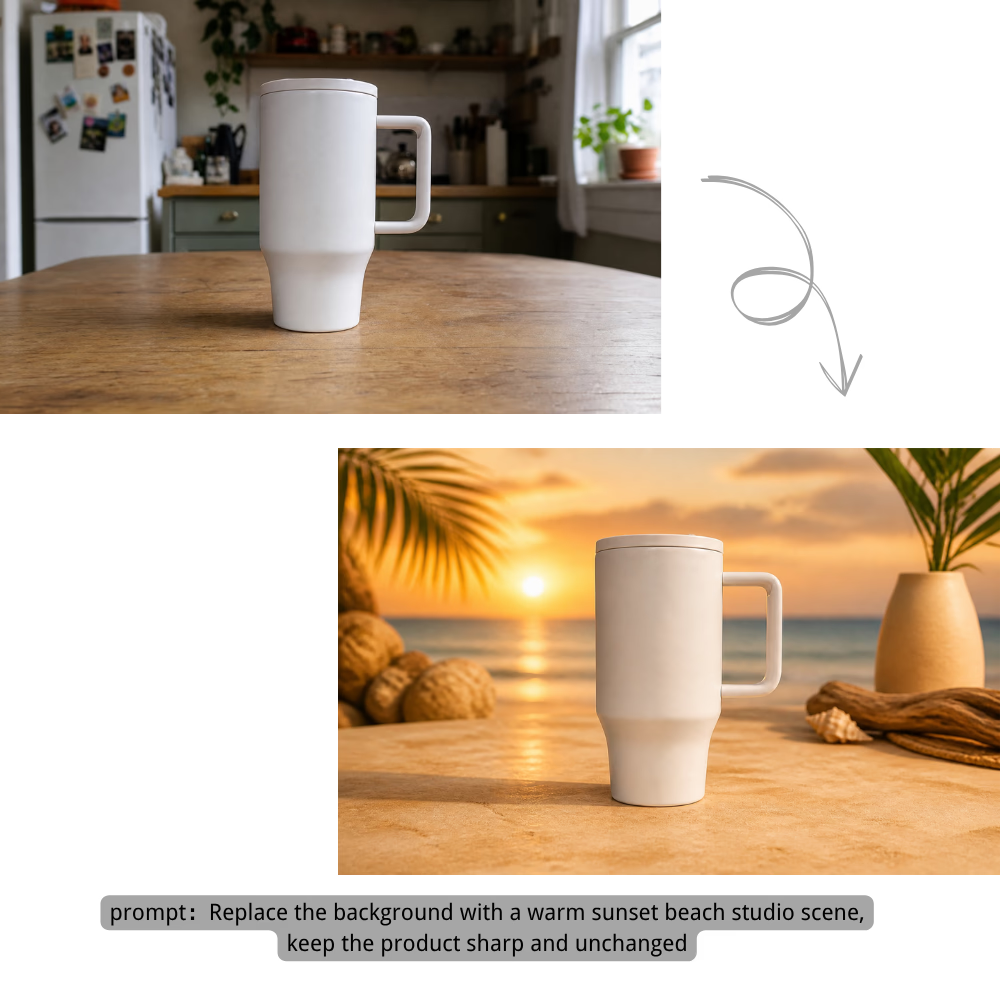
Remove or replace image backgrounds for product photos, portraits, and creative shots.

Background

Replace the background with a warm sunset beach studio scene, keep the product sharp and unchanged

Transform any photo into anime, oil painting, watercolor, or cinematic styles with AI picture style transfer.

Style Transfer

Transform this portrait into a cinematic watercolor anime artwork with luminous city lights

Erase unwanted objects, people, watermarks, or add new elements naturally.

Object Editing

Remove the unwanted object from the room and rebuild the floor and light naturally

Retouch portraits, create professional headshots, and polish profile pictures — smooth skin, change hair, brighten eyes, and add expressions.

Portrait

Retouch the portrait naturally: smooth minor blemishes, brighten eyes, and keep real skin texture

Upscale, sharpen, fix lighting, reduce noise, and restore old photo details.

Quality

Restore this old photo, remove scratches, sharpen details, and recover natural colors

Everything You Can Do with This AI Picture Editor

From quick background removal to complete photo restoration — this free online AI picture editor covers it all with simple text descriptions.

Remove Background in One Click

Remove the background from any picture automatically — hair-level precision, no manual selection needed. Get a clean transparent PNG ready for product listings, profile pictures, or creative composites. The built-in AI picture background remover works instantly.

Remove Background in One Click

Replace Background with Anything You Describe

Type a scene — "beach at sunset," "modern office," "tropical forest" — and AI places your subject into it. Lighting, shadows, and perspective adjust automatically to make it look real. Background replacement has never been this simple — no green screen, no manual masking needed.

Replace Background with Anything You Describe

Remove Unwanted Objects Instantly

Brush over the thing you want gone — a photobomber, a logo, a trash can on the sidewalk. AI erases it and fills the area naturally, like it was never there. Object removal has never been easier in any AI picture editing tool.

Remove Unwanted Objects Instantly

Restore Old Photos to HD

Bring faded, scratched, or blurry old photos back to life with AI old photo restoration. The AI sharpens faces, fixes colors, and removes noise — your grandparents' wedding photo looks like it was taken yesterday. One-click restoration that would take hours with traditional editing tools.

Restore Old Photos to HD

Apply Creative Styles & Filters

Turn a regular photo into Studio Ghibli art, a pencil sketch, a 90s anime scene, or a professional headshot. 50+ styles with AI picture style transfer — one click each. No design experience needed.

Apply Creative Styles & Filters

Enhance Picture Quality

Upscale low-res images to HD, sharpen blurry details, and fix bad lighting — all with one click. This AI picture enhancer requires no manual adjustments. Turn any low-quality snapshot into a crisp, usable image in seconds.

Enhance Picture Quality

How to Use This AI Picture Editor — 3 Simple Steps

No downloads, no design skills, no complicated tools. Just upload your picture, describe what you want, and download the result.

1

Upload Your Picture

Drag and drop your image, paste from clipboard, or click to browse. Supports JPG, PNG, and WEBP files up to 25MB. Your picture stays private and is automatically deleted after processing.

2

Describe Your Edit

Type what you want to change in plain English. "Remove the background," "Turn the cat into a lion," "Make this look like a professional headshot." This AI picture editor with prompt input means no complex tools, no layers, no manual selection — just describe it.

3

Download Your Edited Picture

AI processes your edit in seconds. Preview the result, compare it side-by-side with the original, then download in your preferred format — watermark-free every time. Need to tweak something? Just describe it again and iterate until it's perfect.

Pricing

Choose monthly credits for Ai Picture Editor edits, background changes, object removal, image enhancement, and prompt-guided image generation.

Save 30%

Basic

$15.9/month

For getting started with AI image editing


  • 600 credits included every month
  • Up to 120 standard image edits each month
  • Edit images with prompts, cleanup, and background changes
  • Ideal for product photos, social posts, and quick retouching
  • Full commercial use rights included
  • 24/7 customer support
  • Watermark-free image exports
    Popular

    Pro

    $29.9/month

    For creators who need more output and faster iteration


    • 1,500 credits included every month
    • Up to 300 standard image edits each month
    • Edit images with prompts, cleanup, and background changes
    • Ideal for ecommerce, ads, and frequent creative iteration
    • Full commercial use rights included
    • 24/7 customer support
    • Watermark-free image exports

      Max

      $69.9/month

      For teams and power users with high-volume production


      • 4,000 credits included every month
      • Up to 800 standard image edits each month
      • Edit images with prompts, cleanup, and background changes
      • Built for batch product images, campaigns, and team workflows
      • Full commercial use rights included
      • 24/7 customer support
      • Watermark-free image exports
        Top up

        Need more credits?

        One-time purchase. Add credits anytime — works alongside any plan.

        Best value
        $9.9300credits
        Valid for 30 days300 credits for about 60 standard image edits, valid for 30 daysOther benefits match subscription plans, except for the credit amount

        Who Uses This AI Picture Editor

        From e-commerce sellers to photographers — this free online editing tool fits into any workflow where pictures need to look polished, fast.

        E-commerce Sellers

        Generate product photos for your store in minutes instead of days. Remove backgrounds, place products on clean white or lifestyle scenes, and create consistent catalog images — no photographer or studio needed. One flat product shot becomes dozens of on-brand listing images — the perfect AI picture editor for ecommerce sellers.

        Social Media Creators

        Create scroll-stopping visuals for Instagram, TikTok, and YouTube. Remove distractions, swap backgrounds, apply trending AI styles, and keep your feed looking fresh — each picture optimized for the platform's aspect ratio automatically. Need a new profile picture? Generate polished, platform-ready profile photos with a single prompt — no photoshoot required.

        Photographers

        Cut your post-processing time by 80%. Batch-remove backgrounds, fix skin tones, and enhance details in seconds instead of hours. Spend more time shooting and less time editing — this AI picture editor is the workflow assistant every photographer needs.

        Small Business Owners

        Make professional-looking marketing materials without hiring a designer. Product photos, social media posts, flyers — all created by describing what you want. No Photoshop budget required when you have a free online AI picture editor at your fingertips.

        Anyone with Old Family Photos

        Restore faded memories with one click. Sharpen faces, fix tears and scratches, and bring colors back to life. No technical skills needed — just upload and let the AI do the rest. AI old photo restoration has never been this accessible.

        Why Choose This AI Picture Editor

        Built differently — for people who just want their pictures to look great without the learning curve. Here's what makes this the best free AI picture editor online.

        One Click

        Smart Prompt Suggestions

        Not sure what to type? Click any suggested prompt — "Remove background," "Restore old photo," "Studio Ghibli style" — and see results instantly. Smart prompt guidance means no blank-page anxiety.

        Speed

        3-Second Processing

        Most edits complete in seconds. No spinning wheels, no "please wait" — just upload, describe, and see your result. Speed is what makes this the best free AI picture editor for busy creators.

        Privacy

        Truly Private

        Uploaded pictures are processed and immediately deleted. We don't train on your images, we don't store them, and nobody else can see them. A picture editor you can trust with your personal photos.

        Freedom

        No Watermark, No Forced Signup

        Edit and download without creating an account — no watermarks on your downloads, no strings attached. A truly free AI picture editor that lets you start immediately and stay for the results.

        Any Device

        Works on Desktop & Mobile

        Open your browser, visit the page, and start editing. Works on Windows, Mac, iPhone, Android, and tablets. An online AI picture editor with no app to download, no plugin to install — fully browser-based.

        Fine-tune

        Iterate Until It's Perfect

        Not happy with the first result? Tweak your prompt and regenerate in one click. Keep refining until every detail looks exactly how you want it — no penalty for iterating.

        Trusted by creators worldwide

        100% Commercial Use

        Every picture you edit is yours — no attribution required

        Privacy Protected

        Images auto-deleted after processing — we never store your uploads

        No Watermark Guarantee

        Download clean images ready to use anywhere, anytime

        How to Get the Best Results from Your AI Picture Editor

        A great edit starts with a great prompt. Follow these simple guidelines to write better AI picture editor prompts and get consistently better results.

        4 Tips for Better Editing Prompts

        • Be specific: Instead of "make it better," try "sharpen the image, increase contrast, and brighten the shadows." The AI needs clear direction — vague prompts produce vague results.
        • Describe what to keep: When changing backgrounds or objects, explicitly mention what should stay unchanged. For example: "Change the background to a sunset beach, but keep the person and clothing exactly as they are."
        • Start from a template: Browse the Prompt Templates Gallery above, pick the closest match to your goal, and customize it. Templates are designed to produce reliable results for common editing tasks in this AI picture editor.
        • Iterate and refine: If the first result isn't perfect, tweak your prompt and regenerate. Try adjusting adjectives, adding more detail, or breaking a complex edit into smaller steps. It's free to try again until you get the perfect result.

        Common Prompt Problems & Fixes

        Problem
        Fix
        "make it better"
        "sharpen the image, increase contrast, and brighten the shadows"
        "change the background"
        "change the background to a sunny beach at sunset, keep the person and clothing unchanged"
        "remove the object"
        "remove the coffee cup on the table, keep the laptop, books, and desk lamp"
        "make it look artistic"
        "turn this photo into a Van Gogh oil painting style with bold brushstrokes and vibrant colors"

        Frequently Asked Questions About This AI Picture Editor

        What is an AI picture editor?+
        An AI picture editor is a tool that lets you edit images by simply describing what you want to change — no manual tools, no layers, no design skills needed. You upload a picture, type something like "remove the background" or "turn this into anime style," and the AI makes the edit in seconds. It's the difference between learning to paint and just saying "paint me a sunset."
        Is this AI picture editor really free?+
        Yes — no signup, no credit card required. When server traffic is light, you can edit as a guest right away. During peak times, signing up takes seconds and gives you 25 free credits with priority access. Premium plans are available if you need even higher limits.
        Do I need to create an account to use this AI picture editor?+
        No — you can upload, edit, and download without signing up. When traffic is light, guest editing works instantly. During busy periods, creating a free account takes seconds, gives you 25 credits, and lets you skip the queue. Completely optional either way.
        Will there be a watermark on my edited pictures?+
        Never. All edits — on every feature, free or paid — are watermark-free. You get a clean image ready to use anywhere. Unlike some free online editing tools that add watermarks, we give you clean, unbranded results every time.
        Can I use the edited pictures for commercial purposes?+
        Yes — 100% commercial use included. Every picture you edit is yours. Use them in ads, product listings, social media, print, or anywhere else. No attribution required, no restrictions. This AI picture editor is built for professional and commercial work.
        Are my uploaded pictures private?+
        Yes. Uploaded pictures are processed in memory and automatically deleted after you download. We never store your uploads, never train AI models on them, and never share them with anyone. This AI picture editor treats privacy as a core feature, not an afterthought.
        What image formats does this AI picture editor support?+
        Upload: JPG, PNG, and WEBP files up to 25MB. Download: PNG (best for transparent backgrounds), JPG (smaller file size), and WebP (optimized for web). All common image formats are handled seamlessly.
        How fast is the editing?+
        Most edits complete in just a few seconds. Complex edits (high-resolution images, multiple changes at once) may take slightly longer — but you'll never be stuck watching a progress bar. Speed and simplicity are what make this the best free editing tool for everyday use.
        Can I use this AI picture editor to create a professional profile picture?+
        Absolutely. Upload any photo and describe the look you want — "professional LinkedIn headshot with a clean white background" or "polished profile picture with soft studio lighting." The AI picture editor handles background removal, skin retouching, and lighting adjustments automatically. It's the fastest way to get a professional AI profile picture without booking a photoshoot.
        What kind of edits can I do with this AI picture editor?+
        Remove backgrounds, replace backgrounds with any scene, erase unwanted objects, restore old photos, apply artistic styles (Anime, Ghibli, Sketch, etc.), enhance picture quality, retouch portraits, change colors, and more. If you're not sure, just describe what you want — the AI will try to make it happen.
        How is this AI picture editor different from Photoshop?+
        Photoshop gives you professional tools but requires learning how to use them. This AI picture editor lets you describe what you want in plain English — no training, no layers, no manual selections. It's the difference between learning to paint and just saying what you want painted.
        Can I edit multiple pictures at once with this AI picture editor?+
        Currently you edit one picture at a time. Each edit uses one credit. We're exploring batch editing for future updates to make this AI picture editor even more efficient for high-volume users.
        How do I get the best results from this AI picture editor?+
        Write clear, specific descriptions. Instead of "make it better," try "brighten the picture, sharpen the face, and make the background blurry." The more specific you are, the better the AI can match your vision. Use the prompt templates as starting points — they're designed to produce reliable results.

        Ready to Try This Free AI Picture Editor?

        Upload, describe, and download — all in seconds. No signup, no login, no watermark, no hassle. Start using the best free online AI picture editor today.

        Edit Your Picture Free

        About This AI Picture Editor

        AI Picture Editor is a free online picture editing tool that lets you edit images by describing changes in plain English. Upload a picture, type a prompt, and the AI handles the rest — remove backgrounds with the AI picture background remover, erase unwanted objects, restore old photos with AI old photo restoration, apply artistic styles via AI picture style transfer, retouch portraits and generate professional AI profile pictures, and enhance quality with the AI picture enhancer. Built for ecommerce sellers who need clean product photos, social media creators producing daily content and polished profile pictures, photographers cutting post-processing time, small business owners making marketing materials, job seekers needing professional headshots, and families restoring faded memories — all without downloading software, creating an account, or dealing with watermarks. As a browser-based online tool with no login required, it supports JPG, PNG, and WEBP formats up to 25MB, processes most edits in seconds, and automatically deletes uploaded images after processing. With a library of categorized AI picture editor prompts, an interactive before/after comparison slider, and end-to-end encrypted uploads, it's the best free AI picture editor for getting professional-quality edits directly in your browser — no design skills, no downloads, no hassle.

        LogoAi Picture Editor

        AI image editing tools for cleaner, publish-ready visuals.

        Email
        Company
        Legal
        © 2026 Ai Picture Editor All Rights Reserved.[email protected]We are not affiliated with the model providers. All trademarks belong to their respective owners.
        About
        Contact
        Changelog
        Cookie Policy
        Privacy Policy
        Acceptable Use Policy
        Terms of Service

        Basic

        For getting started with AI image editing

        600 credits

        • 600 credits included every month
        • Up to 120 standard image edits each month
        • Edit images with prompts, cleanup, and background changes
        • Ideal for product photos, social posts, and quick retouching
        • Full commercial use rights included
        • 24/7 customer support
        • Watermark-free image exports

        Pro

        For creators who need more output and faster iteration

        1,500 credits

        • 1,500 credits included every month
        • Up to 300 standard image edits each month
        • Edit images with prompts, cleanup, and background changes
        • Ideal for ecommerce, ads, and frequent creative iteration
        • Full commercial use rights included
        • 24/7 customer support
        • Watermark-free image exports

        Max

        For teams and power users with high-volume production

        4,000 credits

        • 4,000 credits included every month
        • Up to 800 standard image edits each month
        • Edit images with prompts, cleanup, and background changes
        • Built for batch product images, campaigns, and team workflows
        • Full commercial use rights included
        • 24/7 customer support
        • Watermark-free image exports

        Need more credits?

        One-time purchase. Add credits anytime — works alongside any plan.

        300-credit pack

        300 credits

        300 credits for about 60 standard image edits, valid for 30 days

        Valid for 30 days