

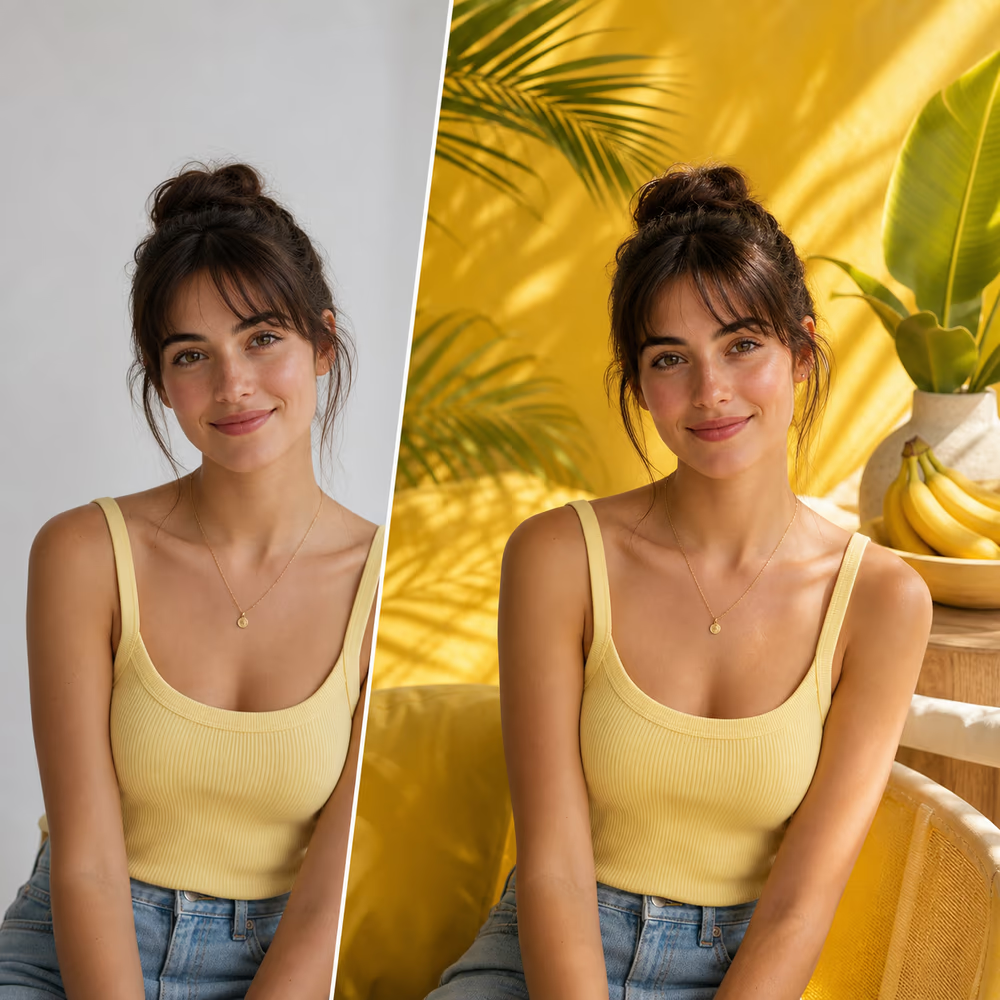
Scene Swap
Change the background to a clean editorial studio scene, keep the subject, pose, clothing, and facial features unchanged, match lighting and shadows naturally.
Upload one or multiple photos, describe the edit you want, and create Nano Banana-style image edits for portraits, products, old photos, and social posts. Start with ready-made prompts or write your own.
Start with a prompt. Reference images are optional; add them when you want to preserve a specific person, product, or scene.
The selected resolution controls the configured credit cost.
Searchers want the viral prompt-editing workflow without wrestling with a blank prompt box. This tool page keeps the workflow simple: upload, choose a template, edit, and refine.
Describe the change in plain English: replace the scene, keep the face, restore the photo, or polish the product shot.
Use extra reference photos when the look depends on a person, product, outfit, object, or specific visual style.
This is an AI picture editor page for Nano Banana-style prompts, not an official Google or Gemini property.
Click a template to send it into the editor, then replace the bracketed details with your own subject, scene, or style.
Change the background to a clean editorial studio scene, keep the subject, pose, clothing, and facial features unchanged, match lighting and shadows naturally.

Retouch this portrait naturally: keep the face structure the same, smooth minor blemishes, brighten the eyes, improve lighting, and preserve real skin texture.

Remove the distracting object from the image, rebuild the background behind it, and keep all other details unchanged.

Restore this old photo, reduce blur, remove scratches and dust, recover natural color, sharpen faces, and keep the original identity unchanged.

Transform this photo into a cinematic illustrated portrait with soft lighting, rich color, and a clean background, while keeping the person recognizable.
Use the same prompt-first workflow for everyday photo fixes, social trends, ecommerce visuals, and personal memories.
Describe the new scene and keep the subject intact. The editor handles background replacement, shadows, and perspective so a quick phone photo can become a polished campaign image.

Use reference images when consistency matters. Preserve a person, product, outfit, or object while changing the setting, lighting, mood, or composition.

Turn faded or damaged family photos into cleaner, sharper pictures. Ask the AI to reduce scratches, recover color, sharpen faces, and keep the original identity natural.

Erase a photobomber, swap a prop, change clothing details, or remove a distracting logo. Prompt-based local edits help you fix the part that matters without starting over.

The page is designed for fast prompt experiments: start from an image, choose a template, then iterate until the result looks right.
Add the image you want to edit. For consistency-heavy edits, include extra reference photos for the person, product, outfit, or scene.
Start from a template or type the exact change you want. Mention what should stay unchanged so the AI protects important details.
Preview the result, adjust the wording, and run another pass if the first edit needs tighter identity, lighting, or background control.
The strongest use cases are visual tasks where a prompt can replace a slow manual editing workflow.
Create viral-style edits, portrait transformations, and shareable before-and-after posts without learning layers or masks.
Turn one product photo into studio, lifestyle, seasonal, or marketplace-ready images while keeping the product recognizable.
Polish selfies, update backgrounds, and test professional portrait looks for LinkedIn, creator profiles, and portfolio pages.
Repair old photos and create memory edits with prompts that protect faces, expressions, and important personal details.
Generate quick visual concepts, campaign variations, and reference-based image edits before spending time on manual polish.
Choose monthly credits for Ai Picture Editor edits, background changes, object removal, image enhancement, and prompt-guided image generation.
For getting started with AI image editing
For creators who need more output and faster iteration
For teams and power users with high-volume production






Trend pages work only when the tool behind them actually lets users do the job. This page keeps the editor, templates, privacy language, and download promise in one place.
Every template is written for a concrete edit, so visitors can start with a reliable prompt and customize the details.
If the first output misses the target, change one instruction and regenerate. The workflow is made for fast visual iteration.
Uploaded pictures are processed for the edit workflow and are not shown publicly on the page.
Built for practical editing
No Watermark
Download clean edited images
Commercial Use
Use outputs in your own projects
Browser-Based
No software install required
Upload a photo, choose a prompt, and generate your first AI edit directly in the browser.