AI Action Figure GeneratorTurn Photos into Toy-Box Edits

Upload a portrait, product, character, or pet photo and turn it into a collectible-style action figure image with a display base, toy packaging, and cinematic product lighting.
Photo-to-Figure Prompt TemplatesToy Packaging and Display LooksWatermark-Free Image Downloads

Send up to 10 images as reference for your edit.

Be specific about what to change and what to keep — clear prompts produce better results.

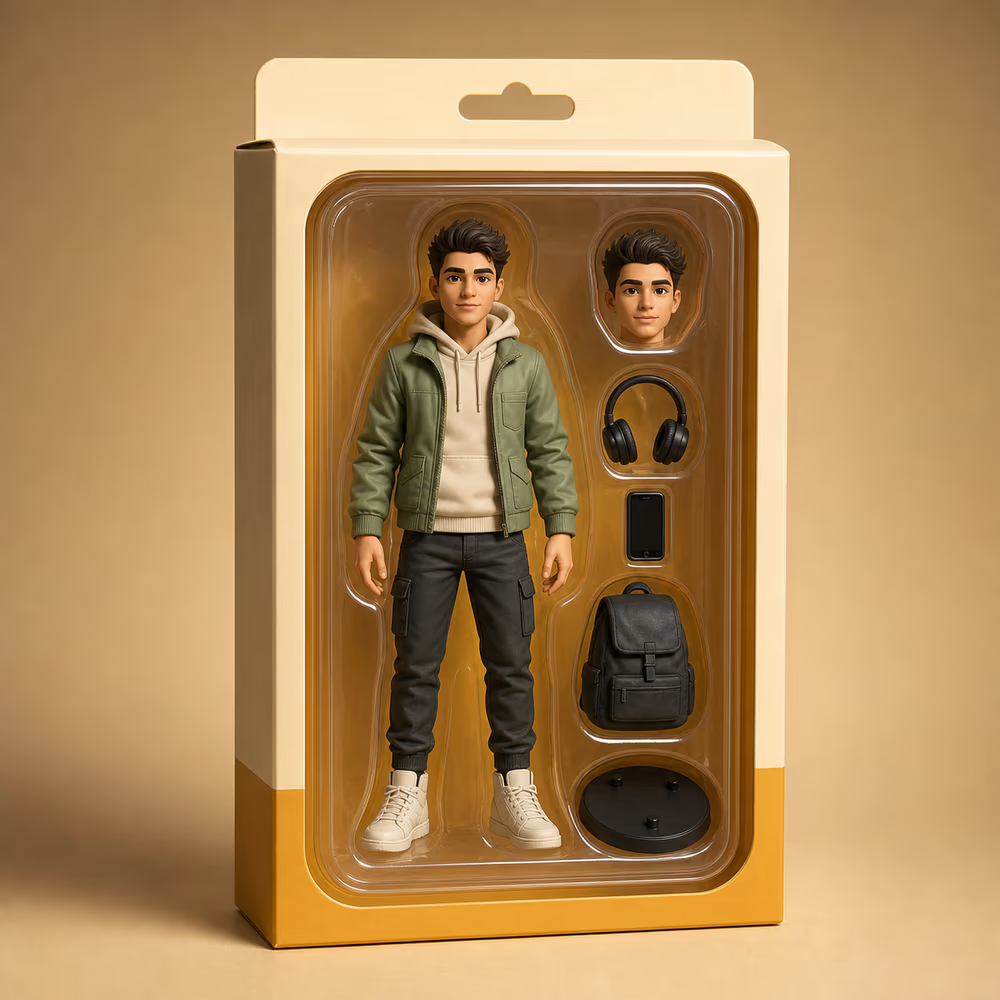
Collectible action figure in generic toy packaging with accessories and studio lighting
Preparing generatorControls will be ready in a moment.

An AI Action Figure Generator for the Viral Toy-Box Look

The action figure trend works best when the prompt describes packaging, pose, scale, lighting, and what must stay recognizable. This page gives you those controls without starting from scratch.

Preserve the subject

Keep facial features, outfit details, product shape, or pet markings recognizable while changing the presentation.

Build toy packaging scenes

Ask for blister packaging, display stands, accessories, desk photos, and catalog-style product lighting.

Create shareable trend images

Generate collectible-style visuals for social posts, profile updates, launch teasers, or playful brand content.

AI Action Figure Prompt Templates

Use these prompts as a starting point, then add the subject, outfit, accessories, color palette, and packaging text you want.

Turn a person into a collectible action figure while preserving their face and outfit.

Portrait Figure

Transform the person in this photo into a realistic collectible action figure in clear toy packaging, keep the face, hairstyle, outfit colors, and identity recognizable, add small accessories that match their style, use studio product lighting.

Create a miniature figure on a display base with realistic desk photography.

Desk Figurine

Create a realistic miniature figurine of the subject on a clear display base placed on a desk, add a small product box in the background, keep the subject recognizable, use macro product photography lighting.

Generate a boxed figure image with clean layout and collectible packaging details.

Toy Box

Turn this image into a boxed action figure product photo with a clean package layout, visible accessories, glossy plastic window, realistic shadows, and a premium collectible feel.

Turn a product, pet, or mascot into a playful collectible character.

Mascot

Transform the main subject into a charming collectible mascot figure with a small display stand, matching accessories, clean background, realistic materials, and product catalog lighting.

Give the action figure image a retro display-card look without using protected brand names.

Retro Card

Create a retro toy-card action figure image from this photo, with bold colors, clean display packaging, illustrated accessory icons, and realistic studio lighting, without using any copyrighted logo or brand name.

What This AI Action Figure Generator Can Create

Use one uploaded image as the base, then ask the AI to build a collectible product-style scene around it.

Turn a Portrait into a Collectible Figure

Generate a toy-like figure while keeping the person recognizable. This works well for creator posts, profile visuals, gift images, and playful personal branding.

Turn a Portrait into a Collectible Figure

Create Toy Packaging Mockups

Ask for a clear plastic window, card backing, display base, small accessories, and product lighting. The output feels like a staged collectible product photo.

Create Toy Packaging Mockups

Make Mascot and Product Figure Concepts

Turn products, pets, and brand mascots into collectible-style visual concepts for launch teasers, store banners, or social campaigns.

Make Mascot and Product Figure Concepts

Control the Style with Prompt Details

Add instructions for scale, pose, materials, lighting, packaging colors, and accessories. More specific prompts produce cleaner, more intentional toy-box images.

Control the Style with Prompt Details

How to Generate an AI Action Figure Image

The workflow is simple: upload a photo, choose a prompt style, then refine the packaging and character details.

1

Upload a Clear Photo

Use a portrait, full-body photo, product image, pet photo, or mascot image. Clear lighting and visible details help the AI preserve the subject.

2

Choose a Toy-Box Prompt

Pick a figure, packaging, desk figurine, mascot, or retro-card prompt. Replace the details with your own accessories, colors, and label text.

3

Refine the Figure

If the face, pose, or packaging needs work, add a tighter instruction and regenerate. Ask the AI to keep identity and key details unchanged.

Who Uses an AI Action Figure Generator

The strongest action figure pages target users who want a fun, finished image they can share immediately.

Social Media Creators

Join the action figure trend with a polished toy-box image instead of a generic filter. The prompt template gives each post a clear visual concept.

Personal Brand Builders

Turn a profile photo into a playful collectible portrait for launch posts, creator bios, and memorable introduction graphics.

Ecommerce and Merch Sellers

Mock up collectible-style product concepts and mascots before paying for a full photo shoot or 3D render.

Gift and Event Planners

Create custom figure-style images for birthdays, team events, graduation posts, or fun printable cards.

Pricing

Choose monthly credits for Ai Picture Editor edits, background changes, object removal, image enhancement, and prompt-guided image generation.

Basic

$15.9/month

For getting started with AI image editing


  • 600 credits included every month
  • Up to 120 standard image edits each month
  • Edit images with prompts, cleanup, and background changes
  • Ideal for product photos, social posts, and quick retouching
  • Full commercial use rights included
  • 24/7 customer support
  • Watermark-free image exports
    Popular

    Pro

    $29.9/month

    For creators who need more output and faster iteration


    • 1,500 credits included every month
    • Up to 300 standard image edits each month
    • Edit images with prompts, cleanup, and background changes
    • Ideal for ecommerce, ads, and frequent creative iteration
    • Full commercial use rights included
    • 24/7 customer support
    • Watermark-free image exports

      Max

      $69.9/month

      For teams and power users with high-volume production


      • 4,000 credits included every month
      • Up to 800 standard image edits each month
      • Edit images with prompts, cleanup, and background changes
      • Built for batch product images, campaigns, and team workflows
      • Full commercial use rights included
      • 24/7 customer support
      • Watermark-free image exports
        Top up

        Need more credits?

        One-time purchase. Add credits anytime — works alongside any plan.

        Best value
        $9.9300credits
        Valid for 30 days300 credits for about 60 standard image edits, valid for 30 daysOther benefits match subscription plans, except for the credit amount

        Why This Tool Works for Action Figure Prompts

        The page is built around the details that make the toy-box effect believable: subject consistency, packaging context, accessories, and lighting.

        Consistent

        Identity Instructions Included

        Templates remind the AI to keep key facial features, outfit colors, product shapes, or pet markings recognizable.

        Detailed

        Packaging-Ready Prompts

        Each template describes the display base, window, card backing, accessories, and lighting that make the trend recognizable.

        Online

        Online Image Editing

        Run the action figure generator in your browser. No editing software, no 3D modeling workflow, and no manual masking.

        Editing safeguards

        Watermark-Free

        Download clean images

        Prompt Templates

        Start without guessing

        Commercial Use

        Use outputs in your projects

        AI Action Figure Generator FAQ

        What is an AI Action Figure Generator?
        It is an AI photo editing tool that turns an uploaded image into a collectible-style action figure scene. You describe packaging, pose, accessories, and lighting, and the AI creates the edited picture.
        Can I make an action figure from my own photo?
        Yes. Upload a clear photo and use a prompt that asks the AI to keep your face, hairstyle, outfit colors, and identity recognizable.
        Can I add toy packaging and accessories?
        Yes. Prompt for a display base, clear package window, card backing, miniature accessories, and product lighting. Add the text you want on the package if the model supports it well.
        Is it free to try?
        You can start from this online tool page and try the editor for free. Higher usage may depend on available credits or account limits.
        Will my image have a watermark?
        No. The edited images you download from this AI picture editor are watermark-free.
        Can I use copyrighted toy brands in my prompt?
        Do not use copyrighted logos, packaging, or protected brand names unless you have the rights. Describe a generic collectible toy-box style instead.
        Why does the figure not look exactly like me?
        AI edits can drift when the prompt changes too much at once. Add instructions like “keep facial features, hair, outfit, and body proportions unchanged” and try again.
        Can I use the output commercially?
        You can use your edited outputs in your own projects, but you are responsible for rights to the uploaded image, names, logos, and any protected characters.

        Create Your AI Action Figure Image

        Upload a photo, choose a toy-box prompt, and generate a collectible-style edit in your browser.