AI Younger Self Photo GeneratorCreate Memory-Style Photo Edits

Upload a current photo and a childhood reference when available, then create emotional younger-self edits such as mirror reflections, side-by-side portraits, and hug-your-younger-self scenes.
Current + Childhood Reference PromptsMirror, Hug, and Memory StylesPrivate, Watermark-Free Downloads

Send up to 10 images as reference for your edit.

Be specific about what to change and what to keep — clear prompts produce better results.

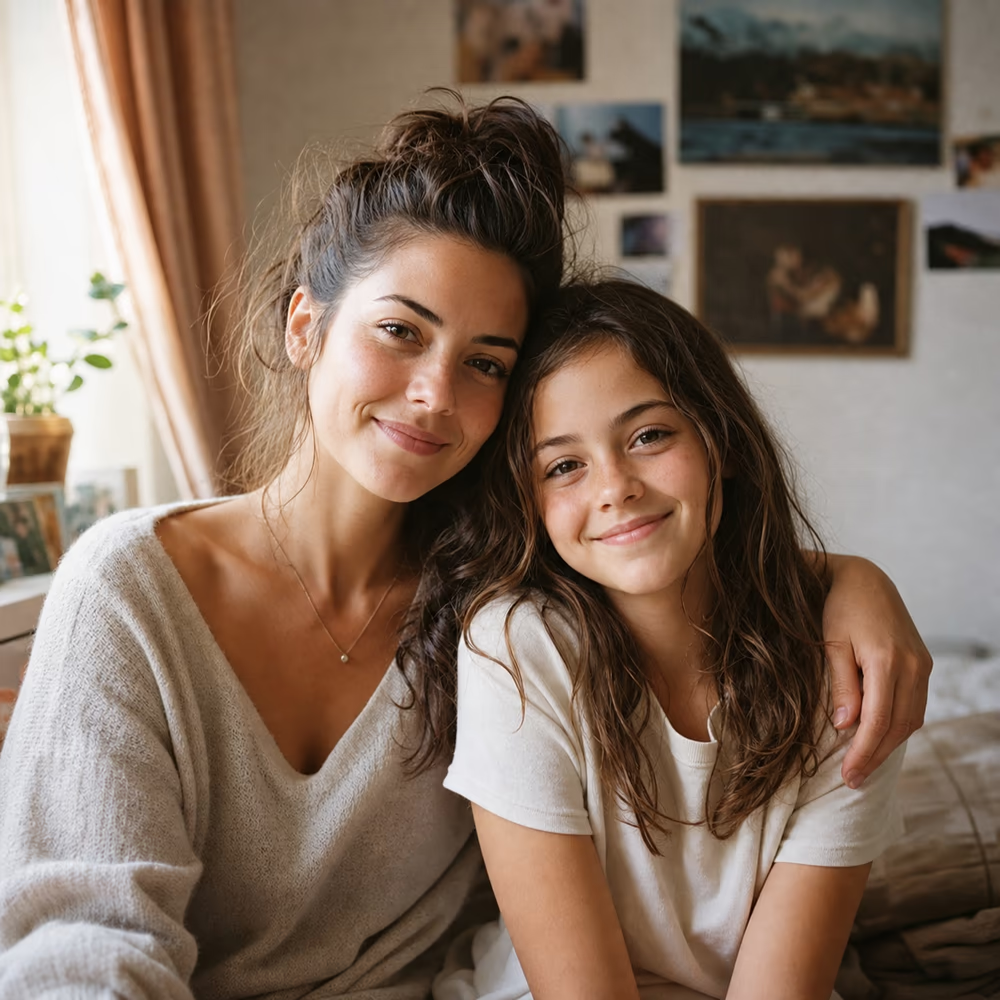
Warm memory-style portrait of an adult with a younger version in a softly lit room
Preparing generatorControls will be ready in a moment.

An AI Younger Self Photo Generator for Multi-Photo Edits

This trend depends on consistency: the current person, younger reference, pose, emotion, and scene all need to fit together. The prompts below are written for that exact job.

Use current and childhood references

Upload a present-day image plus a younger reference photo when you have one, so the AI can preserve identity across both ages.

Create emotional scene concepts

Generate mirror, hug, desk, park, instant-photo, or side-by-side memory scenes with natural lighting and gentle composition.

Keep private photos protected

Use only photos you own or have permission to edit, especially when uploading childhood or family images.

AI Younger Self Photo Prompt Templates

Use a current photo and a childhood photo when possible. The prompt should say what to preserve and how the two ages should interact.

Create a present-day portrait looking into a mirror that reflects a younger version.

Mirror

Create a realistic portrait where the current person stands in front of a mirror, but the reflection shows their younger self from the childhood reference photo, keep both faces recognizable, use soft natural lighting and an emotional memory-photo mood.

Generate the popular hug-your-younger-self memory scene.

Hug

Create a realistic emotional scene where the current person gently hugs their younger self from the childhood reference photo, keep facial features recognizable at both ages, use warm lighting, natural body language, and a soft nostalgic background.

Place current and younger versions together in one believable scene.

Side by Side

Create a realistic side-by-side photo of the current person and their younger self sitting together on a simple bench, keep both identities recognizable, match lighting and perspective, and make the image feel like a candid family memory.

Turn the younger-self scene into an instant-film memory edit.

Instant Photo

Create an instant-film style photo showing the current person with their younger self, keep both faces recognizable, add warm film grain, soft flash, a white frame border, and a handwritten-memory mood.

Create a visual timeline from childhood to present day.

Timeline

Create a realistic timeline portrait that blends childhood and current versions of the same person in one image, preserve identity, use gentle transitions, warm light, and a reflective memory-photo atmosphere.

What You Can Create with This AI Younger Self Photo Generator

Use prompt-based editing to create scenes that combine present-day photos with childhood references in a natural, respectful way.

Create Hug-Your-Younger-Self Photos

Generate a warm scene where your current self and younger self appear together. The prompt includes identity-preserving instructions for both ages.

Create Hug-Your-Younger-Self Photos

Make Mirror Reflection Edits

Create the popular mirror concept where the person looks into a reflection that shows their childhood self instead of their current face.

Make Mirror Reflection Edits

Build Side-by-Side Memory Scenes

Place current and younger versions in the same room, park, bench, desk, or instant-photo frame with matching lighting and perspective.

Build Side-by-Side Memory Scenes

Restore Childhood References First

If the old childhood image is blurry or damaged, restore it before using it as a reference. Cleaner references make younger-self edits more believable.

Restore Childhood References First

How to Make an AI Younger Self Photo

Use a current photo plus a childhood reference when possible, then guide the scene with a clear prompt.

1

Upload Your Photos

Add your current photo and a childhood reference photo if you have one. Use images you own or have permission to edit.

2

Choose a Memory Prompt

Pick mirror, hug, side-by-side, instant photo, or timeline style. Tell the AI to keep both versions recognizable and natural.

3

Refine the Scene

If the age, face, pose, or lighting feels off, update one instruction and regenerate. Clearer reference photos usually improve consistency.

Who Uses an AI Younger Self Photo Generator

These edits are personal, so the best pages speak to real memory and storytelling use cases instead of generic image generation.

Personal Memory Posts

Create a reflective image for birthdays, life updates, graduation posts, or year-end recaps without hiring an editor.

Social Media Creators

Make a trend-ready younger-self image for Instagram, TikTok, or short-form storytelling with prompt templates that save time.

Family Album Editors

Combine restored childhood photos with current portraits to create keepsake images for family albums or private sharing.

Gift Makers

Create a meaningful memory-style image for cards, prints, or personal gifts using photos you have permission to edit.

Pricing

Choose monthly credits for Ai Picture Editor edits, background changes, object removal, image enhancement, and prompt-guided image generation.

Basic

$15.9/month

For getting started with AI image editing


  • 600 credits included every month
  • Up to 120 standard image edits each month
  • Edit images with prompts, cleanup, and background changes
  • Ideal for product photos, social posts, and quick retouching
  • Full commercial use rights included
  • 24/7 customer support
  • Watermark-free image exports
    Popular

    Pro

    $29.9/month

    For creators who need more output and faster iteration


    • 1,500 credits included every month
    • Up to 300 standard image edits each month
    • Edit images with prompts, cleanup, and background changes
    • Ideal for ecommerce, ads, and frequent creative iteration
    • Full commercial use rights included
    • 24/7 customer support
    • Watermark-free image exports

      Max

      $69.9/month

      For teams and power users with high-volume production


      • 4,000 credits included every month
      • Up to 800 standard image edits each month
      • Edit images with prompts, cleanup, and background changes
      • Built for batch product images, campaigns, and team workflows
      • Full commercial use rights included
      • 24/7 customer support
      • Watermark-free image exports
        Top up

        Need more credits?

        One-time purchase. Add credits anytime — works alongside any plan.

        Best value
        $9.9300credits
        Valid for 30 days300 credits for about 60 standard image edits, valid for 30 daysOther benefits match subscription plans, except for the credit amount

        Why Prompt Details Matter for Younger-Self Photos

        A younger-self edit needs more than a style filter. The AI must understand identity, age difference, pose, scene, and emotional tone.

        Accurate

        Reference-Based Prompts

        Templates ask for current and childhood reference photos so the AI has visual anchors for both versions of the same person.

        Responsible

        Consent-Aware Guidance

        FAQ and prompt guidance remind users to upload only images they own or have permission to edit, especially for childhood photos.

        Flexible

        Multiple Memory Styles

        Choose mirror, hug, side-by-side, instant-film, or timeline prompts depending on the mood you want to create.

        Respectful photo editing

        Private Uploads

        Images are not public on the page

        Watermark-Free

        Download clean results

        Prompt Templates

        Start with guided scenes

        AI Younger Self Photo Generator FAQ

        What is an AI Younger Self Photo Generator?
        It is an AI picture editor that creates a scene with your current self and a younger version of you. The best results use a current photo plus a childhood reference photo.
        Do I need a childhood photo?
        A childhood reference photo gives the AI a much better visual anchor. You can try without one, but the younger version may look less accurate.
        Can I make the hug-your-younger-self trend?
        Yes. Use the hug prompt template and upload current plus childhood references. Ask the AI to keep both faces recognizable and use natural body language.
        Can I make a mirror reflection younger-self photo?
        Yes. Use the mirror prompt template to show your current self in front of a mirror where the reflection becomes your childhood self.
        Will the result look exactly like me as a child?
        AI results can vary, especially when the childhood reference is blurry or low quality. Restore the childhood photo first and add identity-preserving prompt instructions for better consistency.
        Is it okay to upload childhood photos?
        Only upload photos you own or have permission to edit. Be extra careful with images of children, family members, classmates, or anyone who has not consented.
        Are my uploaded photos private?
        Uploaded images are used for the editing workflow and are not published on the page. Avoid uploading sensitive images you do not want processed by an online tool.
        Will there be a watermark?
        No. Edited images downloaded from this AI picture editor are watermark-free.

        Create Your AI Younger Self Photo

        Upload your current and childhood references, choose a memory prompt, and generate a younger-self edit online.