LogoAI Picture Editor
  • AI Picture Editor
  • AI Image Generator
  • AI Image Agent
    • Background Remover
      Remove backgrounds locally with no sign-up or usage quota, then download a transparent or color-filled PNG.
    • Image Upscaler
      Enlarge images by 2× or 4× privately with no sign-up or usage quota.
  • Pricing
LogoAI Picture Editor
AI Picture Editor/Image to Image AI/Creative Photo Editing

AI Family Picture Editor Merge Individual Photos Into One Perfect Portrait

Upload photos of each family member — even if they're miles apart. AI brings everyone together in one realistic, watermark-free family portrait. No studio, no photographer, no Photoshop skills needed.

Start with a prompt. Reference images are optional; add them when you want to preserve a specific person, product, or scene.

Free to Use — No WatermarkOnline — No Download NeededKeeps Faces Natural & Recognizable
Describe the image you want to create or transform
Type @ to reference an uploaded image

The selected resolution controls the configured credit cost.

Public
Private
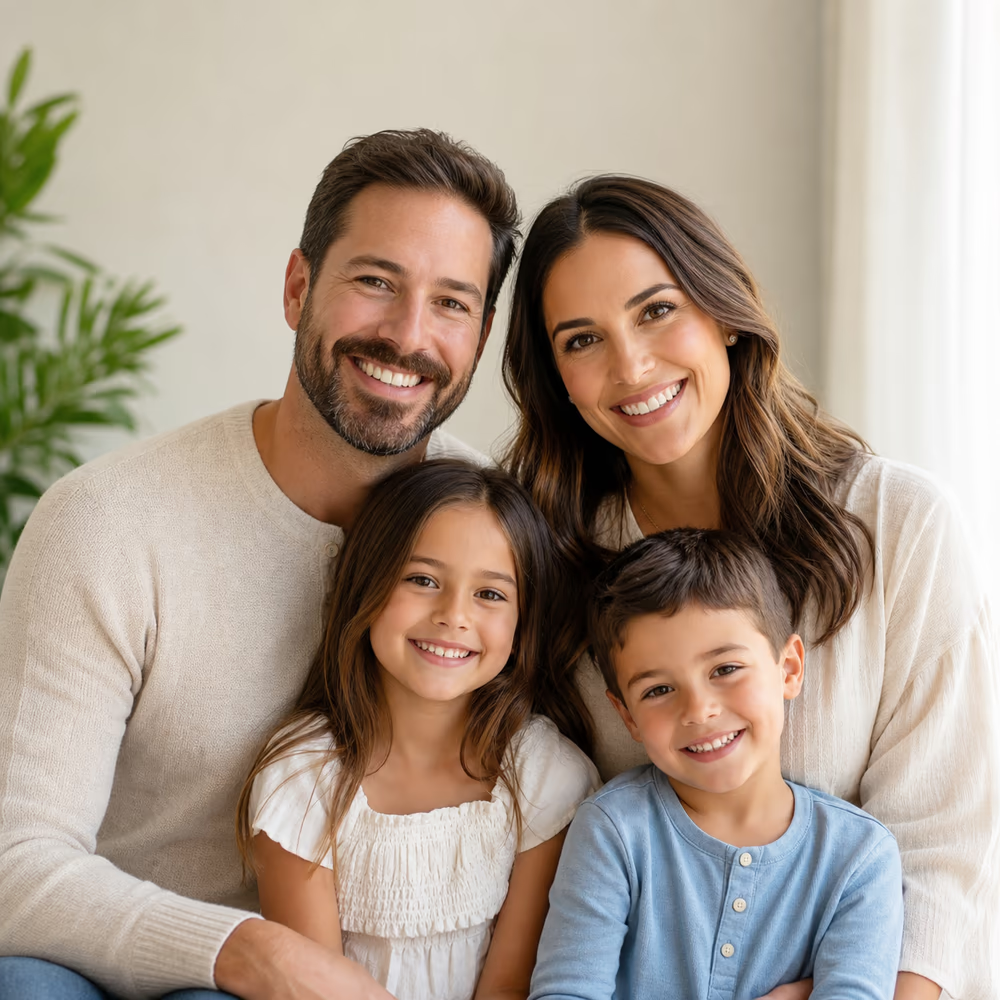
Modern family portrait with four people in soft studio light
Preparing generatorControls will be ready in a moment.

What Is an AI Family Picture Editor?

An online tool that uses AI to create, edit, and enhance family photos — merge individual pictures into group portraits, fix old photos, and add missing family members. No photography or design skills needed.

Merge Individual Photos Into One Portrait

Upload separate photos of each family member — shot on different phones, in different places — and AI combines them into a single cohesive portrait where everyone looks like they were photographed together.

Edit & Enhance Existing Family Photos

Fix broad issues in existing family group photos: adjust lighting, remove distracting backgrounds, reduce noise, and balance color. For a camera blink only, use the dedicated Fix Closed Eyes tool.

Online, No Download Required

Works entirely in your browser. No desktop software to install, no app to download. Start editing immediately on laptop, tablet, or phone — all you need is an internet connection.

Family Picture Editor Prompt Templates

Click a template to send it into the editor, then replace the details with your own family members, style, and scene.

Combine separate individual photos into one natural-looking family portrait.

Merge & Unite

Merge these individual photos into one family portrait, classic studio style with grey backdrop, match lighting and skin tones naturally, keep every face recognizable and unaltered.

Naturally add an absent family member into an existing group photo.

Add Missing Person

Add the person from the second photo into this family group picture, match the original lighting, pose angle, and color tones seamlessly, keep all faces natural and unchanged.

Bring faded, scratched, or blurry vintage family photos back to life.

Restore Old Photos

Restore this old family photo: remove scratches and stains, sharpen blurred faces, recover natural colors, and enhance details while preserving the original vintage character.

Give your family portrait a festive Christmas or holiday makeover.

Holiday Style

Transform this family photo into a Christmas-themed portrait with festive outfits, warm holiday lighting, and a cozy seasonal atmosphere, keep all faces natural and recognizable.

Describe your ideal family portrait in words and AI creates it from scratch.

Text to Portrait

Generate a photorealistic family portrait: a family of four, parents and two kids, sitting on a beach at golden sunset, warm tones, natural smiles, professional composition.

Everything You Can Do with This AI Family Picture Editor

From merging individual photos into one portrait to restoring vintage family memories — this free online AI family picture editor covers it all.

Merge Individual Photos Into One Family Portrait

Take separate photos of each family member — shot on different phones, in different places, even years apart — and AI combines them into a single, cohesive portrait. Everyone looks like they were photographed together. No awkward cutouts, no mismatched lighting.

Merge Individual Photos Into One Family Portrait

Edit & Enhance Existing Family Photos

Already have a family group photo but the lighting is off, the image is noisy, or the background is cluttered? Upload it and use a broad family-photo prompt to improve those issues.

Edit & Enhance Existing Family Photos

Add or Remove People From Family Photos

Missing someone in the picture? Upload their individual photo and AI naturally adds them in — matching lighting, pose, and body angle automatically. Or remove someone who shouldn't be there, with the background seamlessly filled in.

Add or Remove People From Family Photos

Choose From Multiple Portrait Styles

Pick the style that fits your family's personality. Classic studio portrait with a grey backdrop. Cozy home scene on the couch. Beach sunset. Christmas morning in matching sweaters. Cartoon or oil painting for a creative gift. AI adapts to your choice in one click.

Choose From Multiple Portrait Styles

Generate Family Portraits From Text Prompts

Describe your ideal family portrait in words, and AI creates it from scratch. "A family of four in superhero costumes, comic book style" or "Vintage 1970s family photo, warm tones, film grain" — type it and get results in seconds.

Generate Family Portraits From Text Prompts

Restore & Colorize Old Family Photos

Breathe new life into faded, damaged, or black-and-white family photos. AI removes scratches, sharpens blurred faces, and adds natural color — without erasing the character of the original. Perfect for ancestry projects and family archives.

Restore & Colorize Old Family Photos

How to Use This AI Family Picture Editor — 4 Simple Steps

No downloads, no photography skills, no complicated tools. Just upload your photos, choose a style, and download the result.

1

Upload Your Photos

Drag and drop individual photos of each family member — or upload an existing family group shot to edit. Use JPG, PNG, or WebP files within the upload limits shown in the editor.

2

Choose Your Style or Describe Your Vision

Select a preset style (Classic Studio, Home Scene, Outdoor, Christmas, Cartoon, Oil Painting) or type a custom description of the portrait you want. You can also skip this step for a natural, photorealistic result.

3

AI Creates Your Family Portrait

Hit Generate. In under 60 seconds, AI merges the photos into one cohesive portrait — matching skin tones, lighting, and perspective. Everyone looks natural and present, as if they were photographed together. Not satisfied? Click Regenerate for variations.

4

Download, Share, or Print

Download your family portrait in high resolution — ready for printing, framing, holiday cards, or sharing on social media. No watermark. Your photos are automatically removed from our servers after processing.

Who Uses This AI Family Picture Editor

From families separated by distance to anyone restoring old memories — this free online family picture editor brings people together in a single frame.

Families Separated by Distance

Combine individual photos from family members living in different cities or countries into one beautiful group portrait. No need to fly everyone to the same location or book a photographer — AI brings the family together.

Holiday & Christmas Card Creators

Turn a regular family photo into a Christmas-themed portrait with festive outfits, decorations, and warm seasonal atmosphere. Create Thanksgiving, New Year, or Diwali family portraits in whatever style fits your tradition.

Adding the Missing Family Member

Someone was sick, stuck at work, or deployed overseas during the last reunion? Upload the group photo and their individual picture — AI seamlessly adds them in, matching the original photo's lighting, style, and composition.

Restoring & Preserving Family History

Grandma's wedding photo from 1952. Dad's baby picture, faded and cracked. AI restores vintage family photos — removes scratches and stains, sharpens blurred faces, and adds natural color to black-and-white images.

Social Media & Family Group Chats

Create polished, share-ready family portraits in minutes. Choose trending AI styles, add your pet to the picture, or create a fun cartoon version of the whole family. Perfect for profile pictures and "family update" posts.

Pricing

Choose monthly credits for Ai Picture Editor edits, background changes, object removal, image enhancement, and prompt-guided image generation.

Save 30%
One-time credit packs

Basic

$15.9/month

For getting started with AI image editing


  • 600 credits included every month
  • Up to 300 images per monthBased on our lowest-cost image generation: 2 credits per image (Z-Image, 1024 × 1024). Other models and settings use more credits.
  • Edit images with prompts, cleanup, and background changes
  • Ideal for product photos, social posts, and quick retouching
  • Full commercial use rights included
  • 24/7 customer support
  • Watermark-free image exports
    Popular

    Pro

    $29.9/month

    For creators who need more output and faster iteration


    • 1,500 credits included every month
    • Up to 750 images per monthBased on our lowest-cost image generation: 2 credits per image (Z-Image, 1024 × 1024). Other models and settings use more credits.
    • Edit images with prompts, cleanup, and background changes
    • Ideal for ecommerce, ads, and frequent creative iteration
    • Full commercial use rights included
    • 24/7 customer support
    • Watermark-free image exports

      Max

      $69.9/month

      For teams and power users with high-volume production


      • 4,000 credits included every month
      • Up to 2,000 images per monthBased on our lowest-cost image generation: 2 credits per image (Z-Image, 1024 × 1024). Other models and settings use more credits.
      • Edit images with prompts, cleanup, and background changes
      • Built for batch product images, campaigns, and team workflows
      • Full commercial use rights included
      • 24/7 customer support
      • Watermark-free image exports
        Top up

        One-time credit packs

        Buy credits with a single payment. No recurring subscription required.

        Best value
        $9.9300credits
        Valid for 30 daysUp to 150 images. One payment, no subscription.Based on our lowest-cost image generation: 2 credits per image (Z-Image, 1024 × 1024). Other models and settings use more credits.Other benefits match subscription plans, except for the credit amount
        Secure paymentsPowered by Stripe
        MastercardVisaApple PayUnionPayGoogle Pay

        Why Choose This AI Family Picture Editor

        Built for families who want beautiful portraits without the cost, complexity, or commitment of traditional photography.

        Clean

        No Watermark on Downloads

        Your family photos are yours — print, frame, and share them without branding. Unlike many AI tools that put a logo on free exports, every download is clean.

        Natural

        Face-Preserving AI Technology

        Faces stay natural and recognizable. The AI enhances photos without turning people into uncanny, plastic-looking versions of themselves. Your mom still looks like your mom.

        Privacy

        Private & Secure

        Uploaded photos are encrypted and automatically deleted within 24 hours. We never use your family photos to train AI models, and we never share them with third parties.

        Any Device

        Works on Desktop, Tablet & Mobile

        Open your browser and start editing. No software to download, no app to install. The full family picture editor works on any device with an internet connection.

        Edit + Create

        Merge & Edit — Not Just Generate

        Unlike AI portrait generators that only create images from scratch, this editor also lets you enhance, fix, and transform existing family photos. Upload what you have, get what you want.

        Fine-tune

        Iterate Until It's Perfect

        Not happy with the first result? Tweak the style, adjust the prompt, or re-upload better photos and regenerate in one click. Check the displayed credit cost before generating again.

        Trusted by families worldwide

        100% Commercial Use

        Every portrait you create is yours — no attribution required

        Privacy Protected

        Images auto-deleted after processing — we never store your uploads

        No Watermark Guarantee

        Download clean, print-ready family portraits every time

        Frequently Asked Questions About This AI Family Picture Editor

        What is this AI family picture editor?+
        A free online tool that uses AI to create and edit family photos. You upload individual photos of family members (or an existing group photo), and the AI merges them into a realistic family portrait — or enhances your existing photo by fixing lighting, backgrounds, and expressions. No Photoshop skills needed.
        Is it really free? Will I hit a paywall?+
        You can start with the available free trial allowance without a credit card. Your current credits, upload limits, and the cost of each generation are shown in the editor. Additional usage is available through subscriptions or one-time credit packs; trial credits do not automatically renew every day.
        Do my photos have a watermark after downloading?+
        No. Downloaded family portraits are watermark-free. You own your photos. Print them, frame them, share them — no branding on your images.
        Do I need to sign up or create an account?+
        No signup is required to start. You can upload photos and generate your first family portrait immediately. An account is only needed if you want to save your history or access premium features.
        Will the AI change our faces or make us look fake?+
        The AI is designed to preserve face identity — it keeps facial features, expressions, and likeness intact. It won't smooth away personality or make people unrecognizable. The goal is a natural, realistic portrait where everyone looks like themselves, just photographed together.
        How do I combine separate photos into one family portrait?+
        Upload individual photos of each family member (clear, front-facing portraits work best). Choose a style or leave it on natural mode. AI analyzes each face, matches lighting and skin tones across photos, and places everyone into a single cohesive portrait — it takes less than a minute. Download the result. That's it.
        Are my family photos safe and private?+
        Yes. Uploaded photos are encrypted in transit and at rest. They are used only to generate your portrait and are automatically deleted from our servers within 24 hours. We do not use your photos to train AI models, and we never share them with third parties.
        Can I add my pet to the family portrait?+
        Absolutely. Upload your pet's photo along with the family members, and AI will naturally include your dog, cat, or any furry family member in the portrait. Because pets are family too.
        How is this different from traditional photo editing software like Photoshop?+
        You don't need to learn anything. Photoshop requires hours of tutorials to merge people into a photo naturally — layer masks, color matching, perspective correction. Our AI does all of that automatically in under a minute. It's built for family members, not professional designers.
        What's the best way to get realistic results?+
        Use clear, well-lit photos where faces are visible and facing forward. Avoid photos with heavy filters or extreme angles. The better the source photos, the more natural the result. If you're not happy with the first generation, adjust the style, re-upload better photos, or click Regenerate to get variations.
        Can I use the generated family portrait for commercial purposes?+
        Yes. Photos you create with the free editor are yours — you can use them for holiday cards, photo books, framed prints, and personal projects. If you plan to use them in commercial products, please review our terms or contact us.
        Does this work on mobile phones?+
        Yes. The editor works in any modern mobile browser — no app download needed. Upload photos directly from your phone's camera roll, generate and edit, and download your finished portrait.

        Related Family and Portrait Tools

        Keep this broader editor for family portraits, restoration, and multi-person composition; use a focused workflow for one-person insertion or blink repair.

        Add Person to Photo

        Insert one referenced person into an existing group or event photo while protecting the original scene.

        Open tool →

        Fix Closed Eyes in a Photo

        Repair an accidental camera blink while preserving the original group photo and other faces.

        Open tool →

        Portrait Editing Tools

        Browse focused portrait tasks and choose the narrowest workflow for the edit you need.

        Open tool →

        AI Younger Self Photo Generator

        Create memory-style current-and-younger-self portraits from separate photo references.

        Open tool →

        Ready to Create Your AI Family Portrait?

        Upload your family photos, merge them into one beautiful portrait, and download — all in minutes. No signup, no watermark, no hassle.

        Create Your Family Portrait Now

        About This AI Family Picture Editor

        AI Family Picture Editor is an online family photo editing tool for creating and changing family portraits. Upload individual photos of family members and ask AI to merge them into one cohesive family portrait with consistent lighting and perspective. Edit existing family photos by adjusting lighting, removing distracting backgrounds, reducing noise, and balancing color. Choose from portrait styles such as Classic Studio, Home Scene, Outdoor, Christmas, Cartoon, and Oil Painting. Add missing family members or pets, restore faded vintage family pictures, and generate family portraits from text descriptions. For an accidental camera blink without a broader family-photo edit, use the dedicated Fix Closed Eyes in a Photo workflow. Use only photos you own or have permission to edit.

        LogoAI Picture Editor

        AI image editing tools for cleaner, publish-ready visuals.

        Email
        Tools
        • Image to Image AI
        • AI Object Remover
        • AI Object Replacer
        • AI Image Extender
        • AI Product Photo Editor
        • AI Product Ad Generator
        • AI Fashion Model Generator
        • AI Ghost Mannequin Generator
        • AI Background Changer
        • Photo Colorizer
        • Old Photo Restoration
        • AI Image Text Editor
        • Remove Glasses AI
        • AI Action Figure Generator
        • AI Furniture Remover
        • Photo Remove Filter
        • AI Flat Lay Clothing Generator
        • AI Photo Relighting
        • All Tools
        Models
        • GPT Image 2.5
        • ChatGPT Image Editor
        • Qwen Image Edit
        • Grok AI Image Editor
        • Nano Banana Photo Editor
        • Nano Banana 2 Lite
        Company
        • About
        • Contact
        • Changelog
        Legal
        • Cookie Policy
        • Privacy Policy
        • Acceptable Use Policy
        • Terms of Service
        © 2026 AI Picture Editor All Rights Reserved.[email protected]We are not affiliated with the model providers. All trademarks belong to their respective owners.